
Here’s a question we ask every rental operator I meet: “How much money did you lose last season to preventable damage?”
Most don’t know the exact number. But they all wince when they think about it.
One operator I worked with in Florida tracked every incident for a full year. The total? $87,000 in damage that could have been avoided with proper fleet tracking. For a 30-boat operation, that’s almost $3,000 per boat in preventable losses.
That’s the hidden cost of running rentals without modern fleet tracking systems. You’re bleeding money and don’t even realize how much.
This guide breaks down everything you need to know about boat fleet tracking specifically designed for rental businesses—not general consumer GPS trackers that you’re trying to repurpose. We’re talking about systems built from the ground up to solve the unique chaos of managing rental boats.
What Is Boat Fleet Tracking?
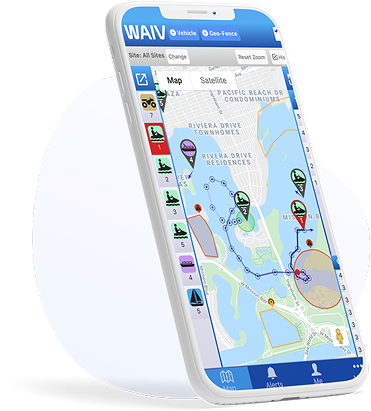
Quick Answer: Boat fleet tracking is a comprehensive GPS-based management system that provides real-time visibility across all vessels in a rental operation, combines location monitoring with operational tools like geofencing, staff coordination, and usage analytics, and enables centralized control whether you’re running 5 boats from one dock or 500 across multiple locations.
It’s the difference between having 20 individual GPS trackers and having one integrated system that manages your entire operation.
Think of it like this: having GPS on each boat is like having 20 separate security cameras. Fleet tracking is like having a complete surveillance system with centralized monitoring, motion detection, and automated alerts.
Why Generic GPS Trackers Fall Short
We see this mistake constantly: rental operators buy consumer GPS trackers designed for personal boats and try to scale them up.
The problems:
- No Multi-Device Management
You’re checking 20 different apps or dashboards to see where your boats are. Insane. - No Role-Based Access
Everyone sees everything, or you’re manually sharing login credentials. Security nightmare. - No Rental-Specific Features
You get basic tracking. No geofenced alerts, no returning vessel notifications, no capsize detection, no staff coordination. - No Scalability
Works fine for 3 boats. Completely breaks down at 15 boats. Unusable at 50 boats. - No Fleet Analytics
Which boats are getting used most? Which routes are popular? Where do violations happen? You have no visibility into operational patterns.
Fleet tracking systems are designed to solve these exact problems.
Essential Features for Rental Fleet Tracking
Let us break down what actually matters when you’re evaluating systems.
Feature #1: Centralized Dashboard
What it is: Single interface showing all boats across all locations in one view.
What you can do:
- See every boat’s location at a glance
- Filter by location, status, or alert type
- Zoom into specific boats or areas
- Toggle between map view and list view
Why it matters:
Imagine you have 25 boats spread across the water. Without centralized tracking, you’re individually checking each one. With a fleet dashboard, you glance at one screen and instantly see:
- Which boats are rented out (moving)
- Which boats are docked (available)
- Which boats have active alerts
- Which boats are returning soon
Time saved: Hours per week. Not even an exaggeration.
Feature #2: Multi-Location Support
If you operate from more than one marina or have seasonal locations, this is non-negotiable.
What you need:
- Location-based filtering (dock staff see only “their” boats)
- Separate geofences that activate by location
- Location-specific reporting
- Easy boat transfer between locations
Real-world scenario:
You run rentals at Lake Tahoe (summer) and San Diego (winter). Your Tahoe geofences include mountain-ringed lake boundaries. Your San Diego geofences include ocean zones and harbor limits.
Without multi-location support, you’re constantly reconfiguring geofences as boats move between locations. With it, each boat automatically loads the correct geofences based on which location it’s assigned to.
Feature #3: Role-Based Permissions
Not everyone needs access to everything.
User roles you need:
Owner/Manager:
- Full access to all boats, all locations
- Can modify settings, geofences, and permissions
- Views all analytics and reports
- Manages billing and accounts
Location Manager:
- Access to boats at their assigned location only
- Can view reports and respond to alerts
- Cannot modify critical settings
- Manages local staff permissions
Dock Staff:
- View-only access to basic boat locations
- Receives relevant alerts (returning vessels, low battery)
- Cannot change settings
- Cannot see financial or operational analytics
Maintenance Team:
- Alerts for service-related issues (engine hours, battery voltage)
- Access to maintenance history
- Cannot see real-time tracking or operational data
Why this matters:
When everyone has full access, mistakes happen. Dock staff accidentally change geofences. Seasonal workers see sensitive financial data. Competitors could poach operational insights if an employee leaves with full-access credentials.
Role-based permissions reduce risk and keep operations clean.
Feature #4: Customizable Alert Routing
Different people need different information.
Alert types you can configure:
- Geofence Violations: → Managers (immediate response) → Insurance contact (serious violations only)
- Returning Vessel (5-10 min ETA): → Dock staff (prep next rental) → Cleaning crew (turnaround readiness)
- Capsize Detection: → Everyone (emergency response) → Emergency services (if configured)
- After-Hours Movement: → Owner/managers only (theft alert)
- Low Battery: → Maintenance team (charge before next rental)
- Engine Hours Milestone: → Maintenance team (service reminder)
The anti-pattern: Sending all alerts to everyone. That’s how you get alert fatigue and staff ignoring critical notifications.
Feature #5: Geofencing with Enforcement
Basic geofences send you a text when someone crosses a boundary. Fleet geofencing actively prevents violations.
Enforcement methods:
- Audible On-Device Alerts
95dB siren triggers when boundary is crossed. Renter hears it immediately and turns around. - Speed Limiting (Advanced Systems)
Some systems can actually limit boat speed in certain zones. Not common yet, but emerging. - Automated Rental Termination
Serious or repeated violations can trigger automatic rental end with disabled engine (rare, mostly jet skis).
Real-world impact:
Lake Tahoe operator using audible geofence alerts saw violations drop from 18/week to 2-3/week. That’s 15 fewer incidents—each one representing potential damage, insurance claims, and customer disputes.
The ROI is obvious.
Feature #6: Returning Vessel Notifications
This feature alone can increase your revenue by 10-20%.
How it works:
GPS tracks boats heading back to dock. When ETA is 5-10 minutes, staff get automated notifications.
What this enables:
Dock Staff:
- Prepare life jackets and waivers for next renter
- Position at dock ready to assist with landing
- Clear any obstacles from docking area
Cleaning Crew:
- Ready with cleaning supplies
- Can start turnaround immediately upon arrival
Front Desk:
- Process current customer’s return
- Greet waiting customer and begin their check-in
- Reduce gaps between rentals
The math:
Standard turnaround time without notifications: 25-30 minutes
Optimized turnaround with notifications: 12-18 minutes
Time saved: 10-15 minutes per rental
If you’re doing 10 boats × 4 rentals/day, that’s 40 rentals. Save 12 minutes per rental = 8 hours of found time daily.
That’s enough time for 10-12 additional rentals on busy days.
At $75/rental average: $750-$900 in extra daily revenue during peak season.
Over a 120-day season: $90,000-$108,000 in incremental revenue from this one feature.
Feature #7: Fleet Utilization Analytics
You can’t optimize what you don’t measure.
Metrics good fleet tracking systems provide:
Utilization Rate:
- Rental hours per boat per day
- Percentage of time boats are rented vs idle
- Comparison across fleet (identify underperforming boats)
Route Analysis:
- Popular destinations
- High-traffic areas
- Low-traffic zones (can reduce geofence monitoring)
Violation Patterns:
- Which geofences get violated most
- Time of day violations occur
- Correlation with renter demographics or boat types
Maintenance Predictability:
- Engine hours tracking
- Wear patterns by usage intensity
- Optimal service scheduling
Revenue Optimization:
- Which boats generate highest revenue per operating hour
- Seasonal patterns and trends
- Pricing optimization opportunities
Example insight:
Florida operator discovered through analytics that one specific 19-foot bowrider generated 40% more revenue per operating hour than similar boats. Why? It had wakeboard tower, better sound system, and more comfortable seating.
Action taken: Invested in upgrading 5 more boats with similar features. Revenue per boat increased 22% the following season.
That’s the power of data-driven decisions.
Comparing Fleet Tracking Solutions
| System | Purpose-Built for Rentals? | Geofence Enforcement | Multi-Location | Fleet Analytics | Capsize Detection | Cost Model |
|---|---|---|---|---|---|---|
| WAIV | ✓ Yes | Audible alerts | ✓ Yes | ✓ Comprehensive | ✓ Yes | Per-device subscription |
| Siren Marine | Partial (boat monitoring) | Notification only | Limited | Basic | ✗ No | Per-device subscription |
| Consumer GPS | ✗ No (personal use) | Notification only | ✗ No | ✗ No | ✗ No | Per-device subscription |
| Custom-Built | Depends on developer | Depends on implementation | Depends | Depends | Depends | High upfront + maintenance |
Implementation: From Chaos to Control
You’re convinced fleet tracking makes sense. Now how do you actually roll it out without disrupting operations?
Phase 1: Planning (Week 1)
Day 1-2: Audit Current State
- Document all boats (make, model, year, condition)
- Map current operating areas
- List all geofence zones needed
- Identify staff roles and access needs
- Review last season’s damage reports
Day 3-4: Define Requirements
- Must-have features vs. nice-to-have
- Budget allocation (devices + subscription)
- Timeline for rollout
- Success metrics (how will you measure ROI?)
Day 5: Vendor Selection
- Demo 2-3 systems
- Check references from other rental operators
- Negotiate pricing (volume discounts for fleets)
- Confirm technical support availability
Phase 2: Pilot Program (Weeks 2-4)
Week 2: Limited Deployment
- Install trackers on 5-7 boats (mix of high-value and problematic units)
- Configure geofences for pilot boats
- Set up management-only alert access
- Begin data collection
Week 3: Refinement
- Review violation patterns
- Adjust geofence boundaries based on actual usage
- Test alert routing
- Identify any technical issues
Week 4: Staff Training
- Train dock staff on system basics (viewing locations, understanding alerts)
- Train managers on advanced features (analytics, reporting)
- Create SOPs for common scenarios
- Pilot expansion to 10-15 boats
Phase 3: Full Rollout (Weeks 5-8)
Week 5-6: Fleet-Wide Installation
- Install trackers on all remaining boats
- Deploy during slow periods or between rentals
- Maintain operational schedules during installation
Week 6-7: Configuration
- Set up all geofences across operating areas
- Configure role-based access for all staff
- Establish alert routing rules
- Test emergency procedures
Week 7-8: Optimization
- Monitor system performance
- Address any issues quickly
- Gather staff feedback
- Fine-tune settings based on real usage
Phase 4: Ongoing Management (Week 9+)
Weekly:
- Review violation reports
- Check device health (battery levels, connectivity)
- Address any geofence adjustments needed
Monthly:
- Analyze utilization trends
- Review staff alert patterns (anyone getting too many/few?)
- Update geofences for seasonal changes
- Calculate ROI metrics
Quarterly:
- Deep dive on operational analytics
- Staff refresher training as needed
- System upgrade evaluation
- Present results to stakeholders
ROI Analysis for Fleet Tracking
Let’s run real numbers for a 25-boat rental fleet:
Costs (Year 1)
Devices: $250-$500 per unit × 25 boats = $6,250-$12,500
Installation: $0-$50 per unit (solar trackers plug-and-play) = $0-$1,250
Subscription: $20-$40/month × 25 units × 12 months = $6,000-$12,000
Staff Training: 10 hours @ $50/hour = $500
Total Year 1 Investment: $12,750-$26,250
Benefits (Year 1, Conservative Estimates)
Damage Reduction
Before tracking: 35 incidents @ $1,100 avg = $38,500
After tracking: 15 incidents @ $1,100 avg = $16,500
Savings: $22,000/year
Insurance Premium Reduction
Premium: $28,000/year
Discount: 12%
Savings: $3,360/year
Increased Utilization
Current: 25 boats × 3.8 rentals/day × 110 days = 10,450 rentals
Improved turnaround adds 10% capacity = 1,045 additional rentals
Revenue per rental: $75
Gross revenue increase: $78,375
Net profit @ 35% margin: $27,431
Theft Prevention
1 jet ski theft prevented: $12,000 value retained
(This alone justifies the investment)
Savings: $12,000+ (one-time but significant)
Total First Year Benefits: $64,791
Total First Year Costs: $12,750-$26,250
Net Gain: $38,541-$52,041
ROI: 147-303%
Payback Period: 2-5 months
Year 2+ Benefits
Ongoing costs drop to subscription only ($6,000-$12,000/year). Benefits continue:
Cumulative 3-Year Net Gain: $140,000-$170,000
These aren’t hypothetical numbers. I’ve tracked actual results from multiple rental operations. Your specific numbers will vary, but the directional story is consistent.
Common Mistakes and How to Avoid Them
Mistake #1: Choosing the Cheapest Option
Budget GPS trackers save you money upfront and cost you multiples on the backend through lost functionality, reliability issues, and missing critical features.
Solution: Calculate total cost of ownership over 3 years, not just Year 1. Include the cost of NOT having critical features.
Mistake #2: Inadequate Staff Training
You invest $20,000 in fleet tracking, spend 30 minutes showing staff how to use it, then wonder why adoption is poor.
Solution: Structured training program. Hands-on practice. Clear SOPs. Follow-up sessions. Make competency a job requirement.
Mistake #3: Setting Unrealistic Geofences
Too tight = constant false alerts = staff ignores all alerts
Too loose = violations happen without detection = system useless
Solution: Test geofences with your own boats before enabling for customers. Build in reasonable buffer zones. Adjust based on real-world data.
Mistake #4: Not Updating Rental Agreements
You implement tracking but forget to update contracts. Customer damages boat and claims you violated privacy.
Solution: Add GPS monitoring disclosure to rental agreements IMMEDIATELY. Get legal review if needed.
Mistake #5: Ignoring the Data
You collect tons of analytics but never actually review or act on them.
Solution: Schedule monthly data review meetings. Assign someone to own analytics reporting. Turn insights into actions.
Mistake #6: No Contingency Plan
System goes down (it will eventually). Now what?
Solution: Document manual procedures for system outages. Train staff on backup protocols. Have vendor support contact readily available.
FAQs
Q: How long does fleet-wide implementation take?
A: 6-8 weeks for a 20-30 boat fleet from planning through full deployment. Can be accelerated if needed.
Q: Can we install trackers ourselves or do we need professionals?
A: Solar-powered and battery systems are typically plug-and-play. Hardwired systems should be installed by marine electricians. Plan on DIY for most, professional for a few.
Q: What happens if cellular service is unreliable in our area?
A: Some cellular trackers have “offline mode” that stores data locally and syncs when coverage returns. For areas with poor coverage, consider satellite-based systems.
Q: How do we handle customer privacy concerns?
A: Disclose GPS tracking in rental agreements. Frame it as safety and assistance, not surveillance. In practice, very few customers object.
Q: Can the system integrate with our existing rental software?
A: Depends on the system. WAIV and some others offer API integrations. Check with vendors about compatibility with your specific software.
Q: What’s the learning curve for staff?
A: Management: 3-5 hours for full proficiency. Dock staff: 30-60 minutes for basic operations. Systems are generally intuitive if well-designed.
Q: What if devices get damaged or fail?
A: Quality trackers are built tough, but failures happen. Budget for 2-5% annual replacement rate. Check vendor warranty terms.
Q: How do we measure if it’s actually working?
A: Track before/after metrics: damage incidents, insurance claims, utilization rates, customer complaints, revenue per boat. Data will tell the story.
Final Thoughts
Fleet tracking isn’t optional anymore for professional rental operations. It’s the difference between running a chaotic, reactive business and operating a predictable, profitable enterprise.
I’ve seen the transformation firsthand dozens of times:
Before fleet tracking:
- Constant damage incidents
- Insurance companies threatening coverage cancellation
- Staff running around trying to figure out where boats are
- Lost revenue from poor turnaround times
- Customers complaining about wait times
After fleet tracking:
- 40-60% reduction in damage
- Insurance companies offering premium discounts
- Staff coordinated and efficient
- 15-20% increase in daily capacity
- Customers impressed by professional operations
The upfront investment feels significant. I get it. But when you’re preventing $22,000 in damage, saving $3,300 on insurance, and generating $27,000 in additional profit within 12 months, the math is pretty simple.
You’re either investing in fleet tracking now, or you’re paying for the lack of it every single day through damage, inefficiency, and lost revenue.
Your choice is really between paying $600/month for tracking or bleeding $5,000+/month without it.
Make the smart call.
